

Firmware
Where to find firmware
Each keyboard half will have it's own firmware depending on what module you have installed.
You can find your firmware files using our Firmware Finder which can be found at https://splitkb.com/fw.
Go to the Firmware FinderFlashing firmware
When you have downloaded the correct firmware for each half of the keyboard you can install it on to the keyboard.
Connect one of the keyboard halves to the computer using a USB cable. On your computer you should see a new device pop up called RPI-RP2. It does not matter if the other half is connected through the interconnect cable.
Drag and drop or copy and paste the firmware file in to the RPI-RP2 device.
If the keyboard is flashed successfully the device should get disconnected and after a couple of seconds the RGB will light up on the keyboard. The flashing process may take a couple of seconds depending on which firmware you're installing. The process should be similar on Windows, Linux and Mac.
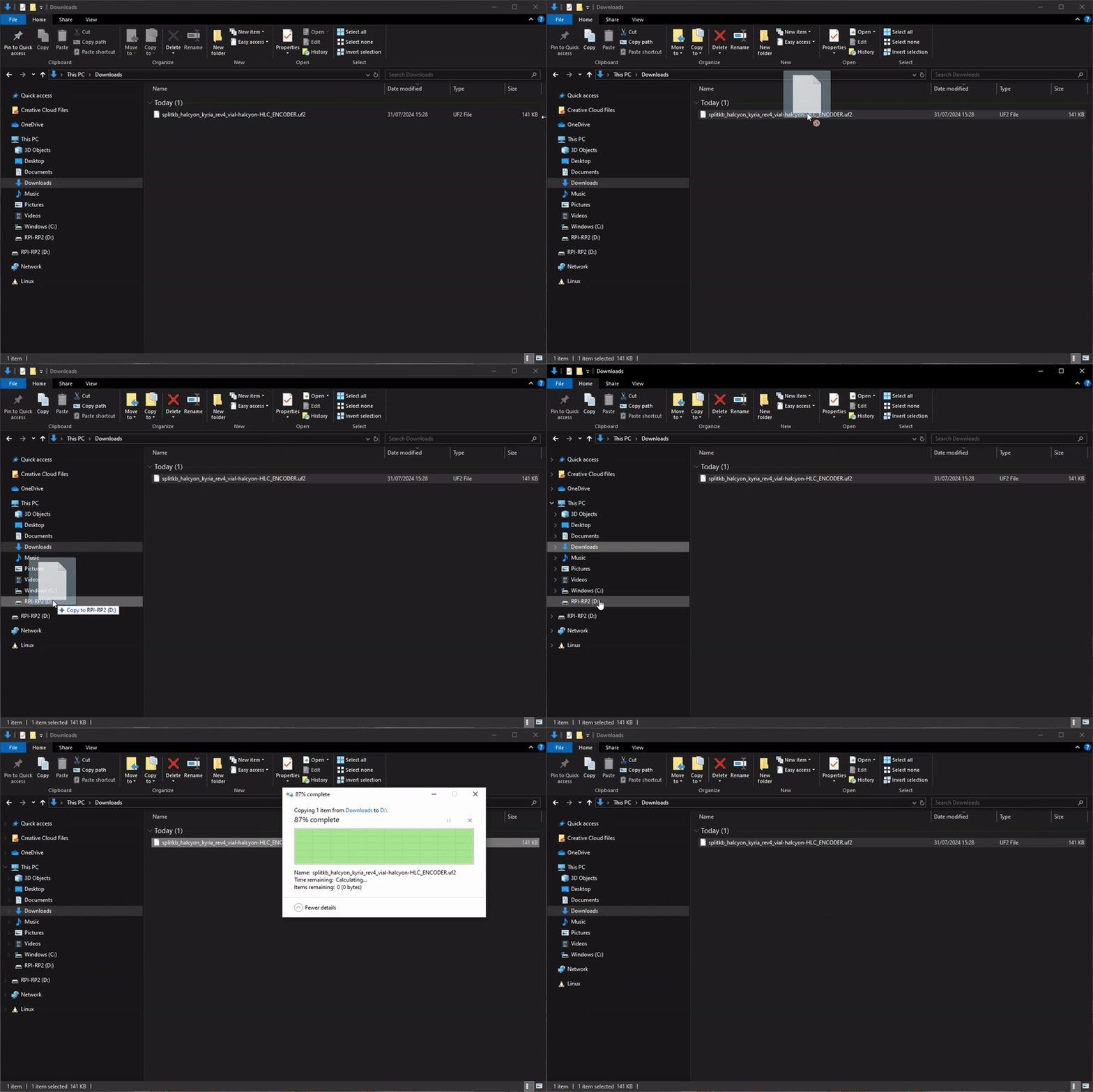
Flashing the keyboard on Windows.
You will now have to unplug the keyboard and plug in the other half of the keyboard as both halves will need to be flashed individually. Repeat the steps above.
Keycaps
Almost there - let's add the keycaps!
Next steps
You've successfully assembled the keyboard. What's next?